The illustrations below show the Mac interface. Controls, colours and detail-panel placement can vary with appearance and available space.
1. Your first reading: start with familiar information
- Confirm the chart title and variant. In the first illustration, it is D1 · Rashi (Natal) Kundali.
- Find I at the top: the first house. Read the Rashi in that sector. Here it is 11 · Aquarius.
- Continue counterclockwise: I → II → III → IV, down the left side, then VII at the bottom, and back up the right side to XII.
- Read the planets in each house. Select a planet to confirm its exact position and supporting details.
- Only then explore Nakshatra/Pada, Drishti and the optional Gochar overlay.
You do not need to learn a new house sequence. The top first house and counterclockwise progression preserve the reading orientation familiar from a North Indian square Kundali.
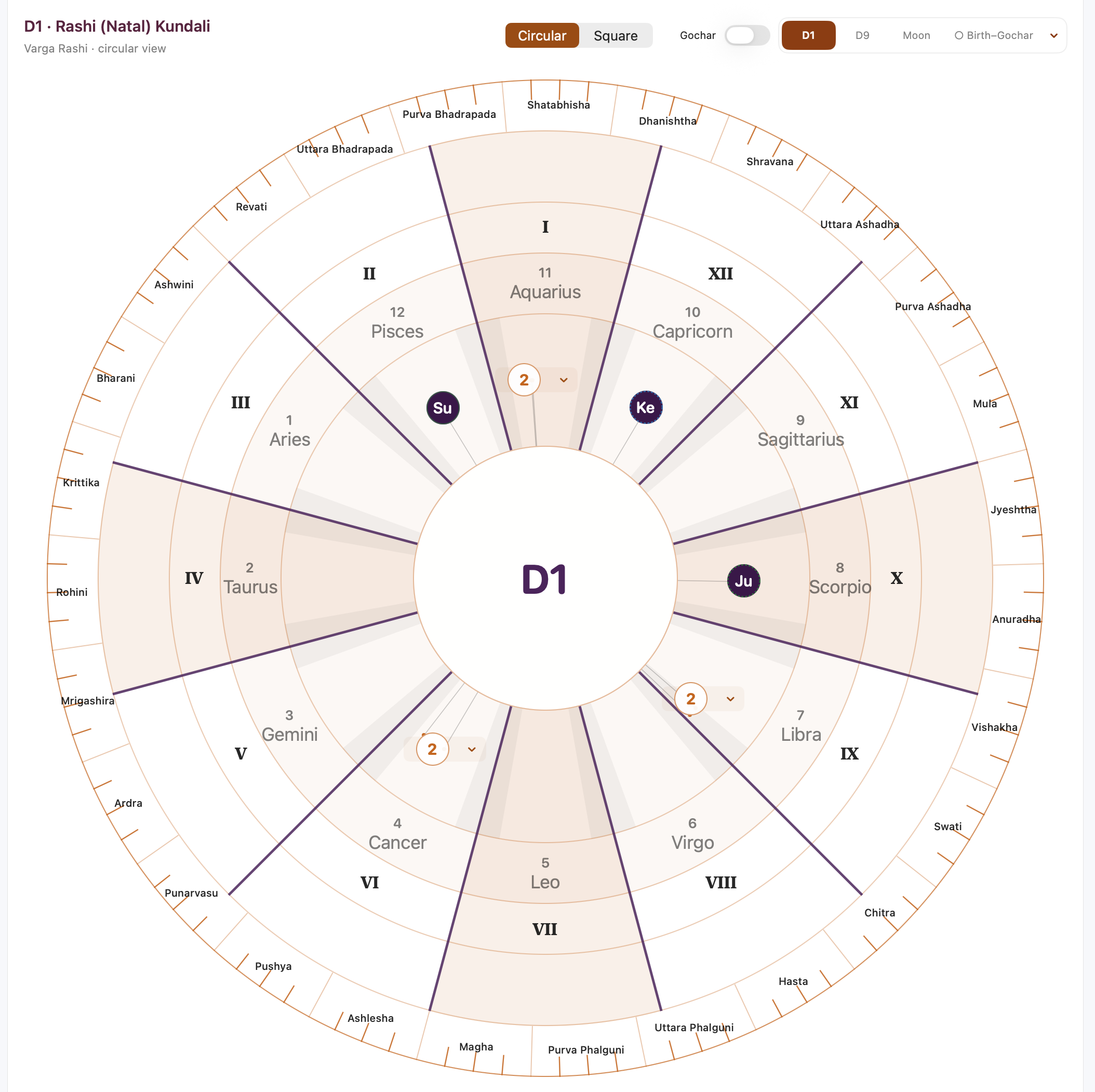
2. The wheel, layer by layer
| Visual layer | What it tells you | How to use it |
|---|---|---|
| Central hub | The active chart identity, such as D1. | Select the hub to clear highlights and return to the default details. |
| Planet track | Planet labels inside their displayed houses and signs. | Select an individual planet for its exact numeric position. |
| Rashi labels | Sign name and sign number, such as 11 · Aquarius. | Select the sign label/number for Rashi details. |
| Roman house labels | I–XII, the twelve Bhavs. | Select a Roman number for Bhav details. |
| Thick purple dividers | House-sector boundaries in this illustrated theme. | Use them to separate neighbouring houses visually. |
| Outer Nakshatra band | 27 Nakshatra sectors, subdivided into four Padas each. | Follow the selected planet’s longitude guide to its highlighted sector. |
| Optional blue outer planet track | Gochar positions at the chosen transit moment. | Keep these separate from the natal planets inside. |
D1 and Moon Rashi use twelve equal 30° sign sectors. The subtle shading of I, IV, VII and X helps identify the Kendra houses. Soft gray bands beside the inner dividers are visual boundary-proximity aids, spanning 5° on either side of a divider. Neither shading nor these bands changes house assignment, planetary strength or a calculation.
3. Do not confuse house numbers with Rashi numbers
Roman numerals identify houses. Ordinary numbers identify signs. I always means the first house in the active view; 1 means Aries, not necessarily the first house. Rashis follow the standard numbering: Aries 1, Taurus 2, Gemini 3, Cancer 4, Leo 5, Virgo 6, Libra 7, Scorpio 8, Sagittarius 9, Capricorn 10, Aquarius 11 and Pisces 12.
In Figure 1, the chart begins with Aquarius. This is the complete mapping for that example—not a fixed mapping for every Kundali:
| House | Rashi in this example | House | Rashi in this example |
|---|---|---|---|
| I · 1st | 11 · Aquarius | VII · 7th | 5 · Leo |
| II · 2nd | 12 · Pisces | VIII · 8th | 6 · Virgo |
| III · 3rd | 1 · Aries | IX · 9th | 7 · Libra |
| IV · 4th | 2 · Taurus | X · 10th | 8 · Scorpio |
| V · 5th | 3 · Gemini | XI · 11th | 9 · Sagittarius |
| VI · 6th | 4 · Cancer | XII · 12th | 10 · Capricorn |
When the Ascendant changes, the Rashi occupying House I changes. In the Moon view the reference is the natal Moon’s sign, rather than the natal Ascendant.
4. Planet markers, degrees and overlapping labels
English abbreviations in these screenshots are Su (Sun), Mo (Moon), Ma (Mars), Me (Mercury), Ju (Jupiter), Ve (Venus), Sa (Saturn), Ra (Rahu) and Ke (Ketu). Localized labels may be shown in other app languages.
A planet’s angular position represents its position within the active chart’s sign. However, the visible circle is a readable label, not a measuring instrument: its centre is inset within the sector, and overlapping labels may be grouped. Fine guides and small position dots preserve the actual chart anchors. Read the exact degree from the selected-planet details or overlap menu, not from the badge’s centre.
What does an orange “2” mean?
It means two planet labels are grouped at that location to avoid overlap. Open its menu and choose the planet you want to inspect. It does not mean 2°, the second house, a strength score or an aspect count. Grouping is a display convenience; the individual positions remain available.
Colours and motion indicators
- Purple inner badges: natal planets in the Mac illustrations.
- Royal dark blue outer badges: Gochar planets in the Mac illustrations. Blue fill identifies the transit layer; it is not itself a friendship judgement.
- Dashed circumference: retrograde motion. Confirm the Motion field in the details.
- Relationship colour: green for friend, red for enemy, blue for neutral, according to the app’s sign-lord relationship classification. Unclassified nodes also use blue; blue does not always mean neutral.
- Gray combustion styling: shown where applicable. Read the selected details because motion, combustion and relationship states can coexist.
Do not rely on colour alone. Planet names, numeric fields and status text provide the dependable reading, including when appearance or platform styling differs.
5. Read the outer Nakshatra and Pada band
The outer band divides the sidereal zodiac into 27 Nakshatras. Each Nakshatra contains four Padas, giving 108 subdivisions around the wheel. The short clock-like ticks mark the internal Pada boundaries—not hourly time marks.
- Select a planet.
- Find its highlighted outer Nakshatra/Pada region.
- Follow the selected longitude guide between the planet’s anchor and that region.
- Confirm the Nakshatra name and Pada number in the details panel.
Large wheels show Nakshatra names. Compact wheels may show numbers to keep the chart legible; selection supplies the full name. The outer ring is aligned to sidereal longitude, not simply to the centre of each house. A house and a Nakshatra are different divisions.
6. Read Drishti without mistaking the guide for a new rule
Selecting a planet displays its existing calculated whole-house Graha Drishti targets. Bold dark-purple dashed lines distinguish the selected Drishti guides from ordinary placement connectors.
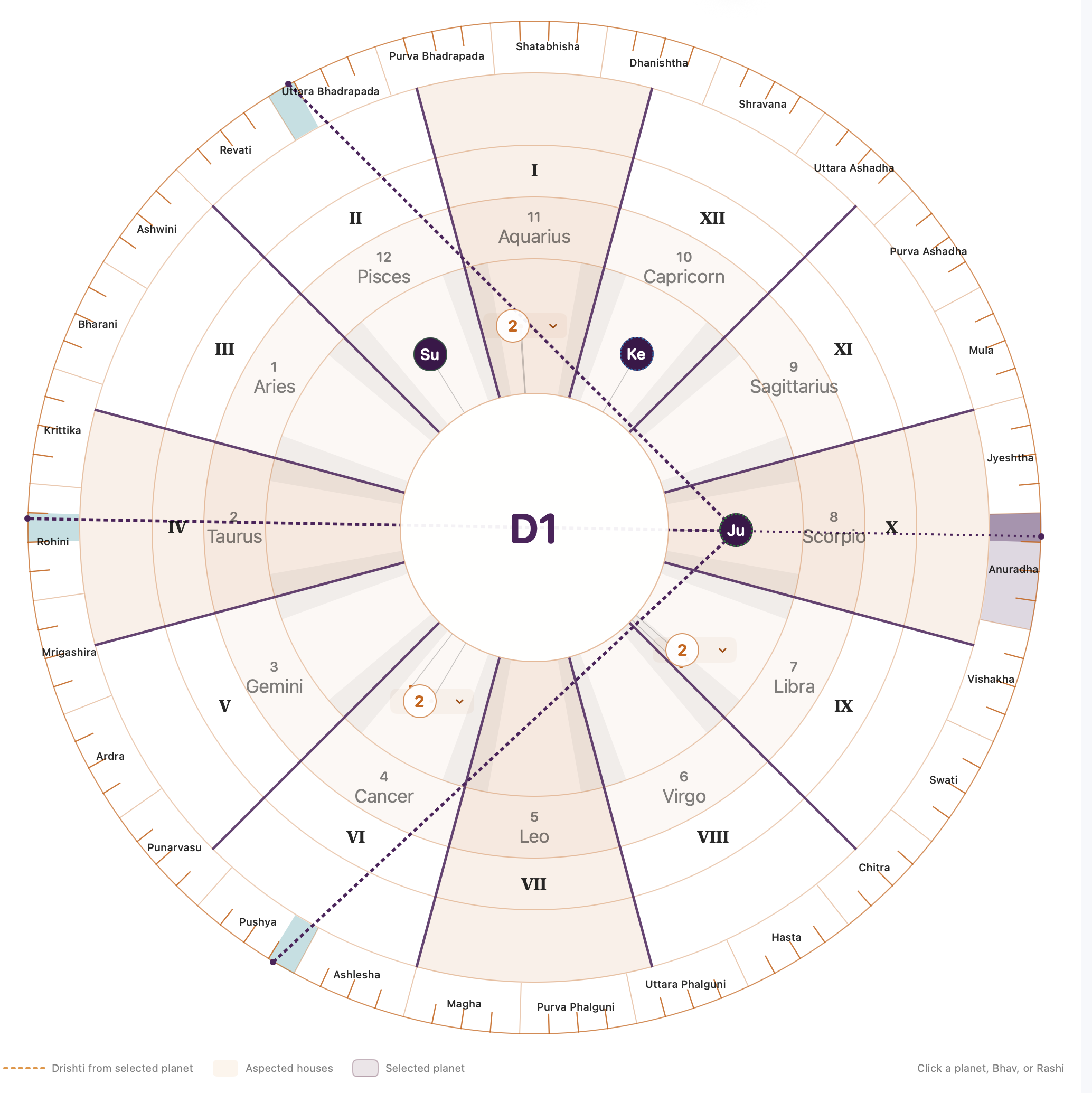
Worked example: natal Jupiter
- Locate Ju in X, the tenth house, containing 8 · Scorpio.
- Select Ju. The chart shows target houses II, IV and VI.
- In this example those houses contain Pisces, Taurus and Cancer.
- Use the outer highlights and the selected details to inspect the projected Nakshatra/Pada locations.
A line passing across another badge is not sufficient evidence that the other planet receives an aspect. Use the explicit “Drishti to Planets,” “Drishti from Planets” and target-house fields. Lines that cross are not automatically conjunctions.
7. Read birth and Gochar together
Enable Gochar on a supported natal D1 or Moon Rashi view. The natal reference stays fixed; transit planets appear on a separate outer track. This makes it possible to inspect current positions against the chosen natal reference without replacing the birth chart.
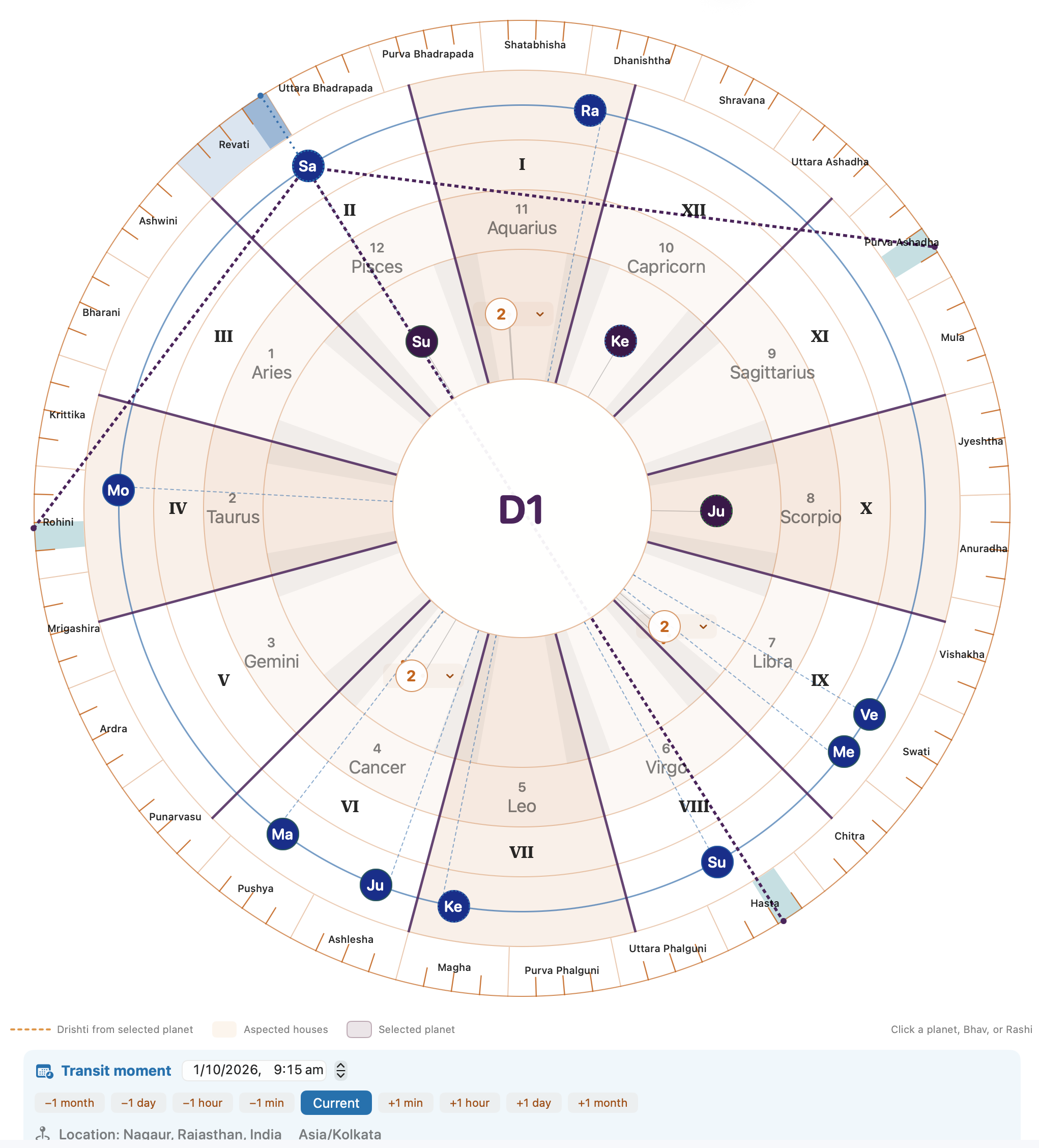
Worked example: transit Saturn
In Figure 3, blue Sa is in II · Pisces relative to the natal Aquarius first house. Selecting it shows Drishti to IV, VIII and XI—Taurus, Virgo and Sagittarius in this chart. The outer target highlights are same-degree visual projections, with the same limitation explained above.
Change the transit moment
- Check the location and time zone shown with the controller.
- Choose a local date and time, or use the month/day/hour/minute step buttons.
- Use Current/Now to return to the current moment.
- Compare the updated transit layer and selected planet details while the natal chart remains unchanged.
The example controller uses Nagaur, Rajasthan, India and Asia/Kolkata. Your own selected location and time zone may differ. Dates in illustrations are examples, not a permanent “current” chart.
Overlay, standalone Gochar and comparison are different
- Natal D1 overlay: transit houses are read from the natal Ascendant reference.
- Moon Rashi overlay: transit houses are read from the saved natal Moon’s Rashi.
- Standalone Gochar: House I is the calculated Gochar Lagna at the chosen moment and location; there is no saved natal anchor. The same transit planet can therefore have a different displayed house.
- Birth–Gochar comparison: a paired-chart view for comparing birth and transit information.
- Two saved Kundalis: a separate comparison of two selected saved charts, not a transit overlay.
Gochar overlay is available for D1 and Moon Rashi, not for Bhav Chalit or divisional views. If you need the familiar layout, switch to Square while keeping the same supported chart context.
8. Use the details panel as your numerical reference
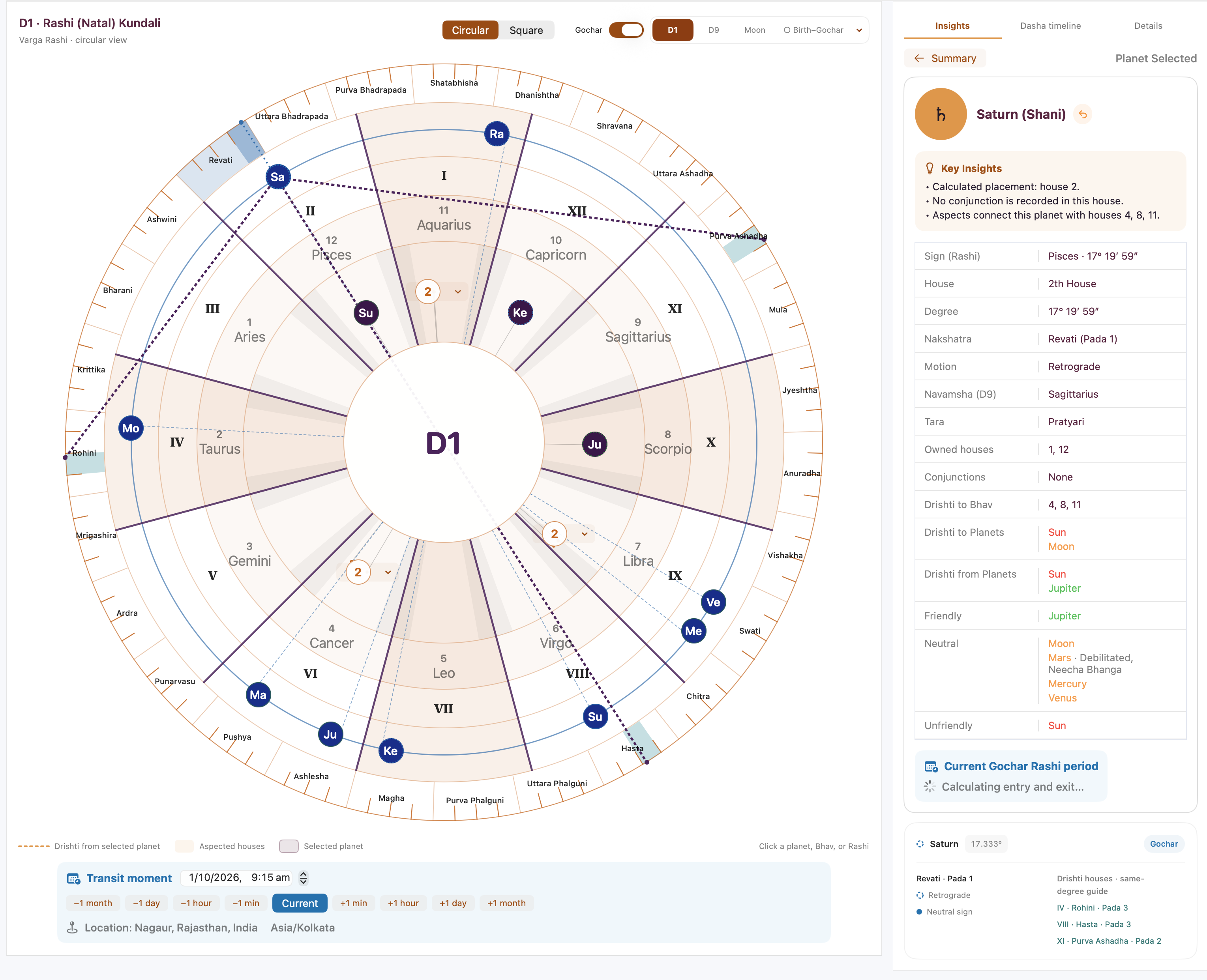
In this screenshot, the selected transit Saturn is listed as Pisces · 17°19′59″, 2nd House, Revati (Pada 1) and Retrograde. These fields answer different questions: sign, position within the sign, reference-house placement, lunar subdivision and motion.
Where available, the panel also shows Navamsha, Tara, owned houses, conjunctions, outgoing and incoming Drishti, and relationship classifications. Read each named field separately. “Owned houses” is not the same as the house occupied by the planet; “Drishti from Planets” is incoming, while “Drishti to Planets” is outgoing. Relationship labels describe the app’s technical classification, not a prediction of a life event.
The compact summary may show a decimal degree, such as 17.333°, alongside a degrees/minutes/seconds field. These are different numeric formats; rounding can produce a small display difference.
Gochar Rashi entry and exit
When available, the selected transit planet can show approximate entry/exit dates for its current Rashi, formatted in the chart location’s time zone. A loading message such as “Calculating entry and exit…” means the result is not yet displayed. A Rashi stay is not a house stay in standalone Gochar, because the Gochar Lagna moves. Do not use these approximate dates as a guarantee of exact boundary timing.
9. What changes in other chart variants?
| View | Reading reference | Important distinction |
|---|---|---|
| D1 · Rashi | Natal Ascendant sign at House I. | Whole-sign houses; the starting sign depends on this chart. |
| Moon Rashi | Natal Moon sign at House I. | The reference changes; the saved planetary longitudes do not. |
| D9 and other enabled Vargas | Transformed divisional Ascendant and planet positions. | Read the selected Varga, not D1 house placement. Outer Nakshatra/Pada retains natal sidereal identity. |
| Bhav Chalit | Calculated Bhav centres and boundaries. | Houses can be unequal. Original D1 longitudes/Rashis remain; a Rashi can span more than one Bhav. |
| Standalone Gochar | Current Gochar Ascendant at the selected moment/place. | All planets belong to that Gochar result, rather than a natal overlay. |
In Bhav Chalit, do not assume every house sector is 30°. The house geometry and the 30° Rashi divisions are separate. A Rashi selection describes the Bhav containing that Rashi’s midpoint, not necessarily every part of the sign. BC displays whole-house Drishti information but not the D1 same-degree target-Rashi projection, because there is no unique BC target sign. Where a saved chart lacks usable BC geometry, the app retains the square renderer.
10. Circular versus Square: choose the reading tool you prefer
| Task | Circular | North Indian Square |
|---|---|---|
| Identify houses and signs | Separate Roman-house and Rashi-label rings; counterclockwise sequence. | Familiar fixed-house arrangement with sign numbers in compartments. |
| See degree context | Angular anchors and guides show relative position within a sign. | Numeric labels/details are the main reference. |
| Connect Nakshatra/Pada | Outer band and selection highlights provide direct visual context. | Use the available planet details for the same underlying identity. |
| Study Drishti | Selected lines and house highlights make relationships visible. | Familiar compartment-based reading; consult explicit details. |
| Distinguish birth and transit | Separate inner natal and outer Gochar tracks where supported. | Use the supported transit presentation and its labels. |
| Read many planets together | Overlap menus keep crowded labels readable. | Compact familiar grouping within house compartments. |
| Calculation result | The same selected chart data. Neither layout is intrinsically more accurate. | |
The circular view is particularly useful when studying how house, sign, degree, Nakshatra/Pada and a selected transit fit together. Square remains useful for quick traditional reading and for practitioners who already recognize its layout immediately. Switch between them to cross-check the same chart; you do not need to abandon your established reading method.
11. A short practice session
- Using Figure 1, find House III. Which Rashi is there?
- Find natal Jupiter. Which house and Rashi contain it?
- Using Figure 2, identify Jupiter’s three displayed target houses.
- Using Figure 4, read transit Saturn’s house, Nakshatra/Pada and motion.
Check your answers
1. III contains 1 · Aries. 2. Ju is in X · 8 · Scorpio. 3. II, IV and VI. 4. House II, Revati Pada 1, Retrograde.
Common mistakes to avoid
- Reading the houses clockwise instead of counterclockwise.
- Reading a Rashi number as a house number.
- Assuming the top sign is always Aries.
- Treating a grouped “2” badge as a degree or strength value.
- Estimating exact degrees from the visible badge centre.
- Confusing faint radial placement connectors with bold selected Drishti lines.
- Treating target Pada highlights as a new degree-specific aspect rule.
- Mixing a blue Gochar planet with a purple natal planet.
- Comparing standalone Gochar house numbers with natal-overlay houses without checking the reference.
- Applying equal 30° house assumptions to Bhav Chalit.
A reliable everyday workflow
Confirm the variant → identify House I and its reference sign → read houses counterclockwise → select planets for exact details → inspect Drishti → add Gochar only when needed → switch to Square for a familiar cross-check.
This guide explains the app’s presentation and technical reading tools. It does not prescribe predictions, remedies or a replacement Jyotish tradition. If a placement appears unexpected, first check the active variant, natal/transit label, reference, date/time and location before interpreting it.